
 by Mit Thakkar
With the rising requirement of the virtual world, accessibility is becoming a necessity, but not an option. Imagine trying to get a consultation from a specific service provider but being unable to “tap on the consultation” button because of a lack of physical accessibility. These types of experiences happen regularly for millions of people with disabilities. The world has more than 1.3 billion people on the planet with some level of disability.
When a business makes products accessible to all users, it will stand out globally. The accessibility testing for government websites should be more than the regulatory demands. The regulatory product is designed by considering human-centered design and inclusiveness. More than 70% of sites don’t confirm the basic accessibility standards.
The WCAG is the technical standard that supports businesses in making the virtual world accessible to people with disabilities. Users with disabilities like vision loss, hearing loss, or cognitive disabilities greatly benefit from this. Accessibility testing service directly impacts user experience, strengthening brand reputation for a diverse global audience. Organizations that want to offer an inclusive experience to their user can read this blog for more information.
What Is Accessibility Testing and Why Does It Matter?
➔ Defining Accessibility Testing
A quality assurance technique called accessibility testing determines if digital items can be used by individuals with disabilities. By confirming that apps are compatible with assistive technology, this specialized testing verifies adherence to accessibility standards like WCAG. The basic idea is straightforward: your program fails accessibility testing if a person with a handicap is unable to view, use, comprehend, or engage with it.
➔ Benefits from Accessible Government Systems?
☑ Citizens with disabilities and diverse access needs
By eliminating technological obstacles and guaranteeing equitable access to public services, accessible government systems empower persons with disabilities. Screen reader support, keyboard navigation, alternate text, clear layouts, captions, and other features enable users to obtain information, execute tasks on their own, engage in civic processes, and use digital government platforms with confidence.
☑ Older adults and users with temporary impairments
Simplified navigation, understandable writing, unambiguous directions, and user-friendly interfaces are beneficial for older adults and those with temporary disabilities. Systems that are accessible make it easier to obtain healthcare, pensions, and other necessities by lowering mental and physical burden. The accessibility testing government boosts self-assurance, reduces mistakes, and promotes ongoing use of digital government services.
☑ All users: how accessibility improves universal usability
By fostering more intuitive interactions, quicker navigation, and clearer layouts, accessibility testing in the public sector improves usability for all users. Errors and irritation are decreased by responsive design, well-structured material, and straightforward workflows. All users benefit from more seamless interactions, more contentment, heightened confidence, and wider adoption of digital government technologies as a result.
Understanding WCAG: The Foundation of Accessibility Compliance
➞ What Is WCAG?
The WCAG is a technical standard that supports making the digital world accessible to individuals with impairments. Although WCAG is not a law, organizations should adhere to its guidelines if they wish to comply with the ADA. Developers and designers can use WCAG’s numerous success criteria to eliminate obstacles that prevent those with impairments from accessing digital environments.
➞ WCAG Versions: What’s Changed and What You Need to Know
• WCAG 2.0: The global baseline standard for accessible digital experiences was formed by WCAG 2.0, which established fundamental accessibility principles with an emphasis on perceivable, operable, comprehensible, and robust content.
• WCAG 2.1: In order to improve experiences on smartphones, tablets, and other contemporary devices, WCAG 2.1 extended the criteria to cover low vision demands, touch interactions, mobile usability, and cognitive accessibility.
• WCAG 2.2: In order to ensure more inclusive access and match accessibility practices with changing user expectations, WCAG 2.2 introduces improvements for focus visibility, input assistance, authentication, and error prevention.
➞ WCAG Compliance Levels Explained
• Level A: Level A does not guarantee a completely usable or inclusive experience, but it does cover the necessary standards to remove important barriers, allowing users with disabilities basic access.
• Level AA: Level AA is the most commonly needed level for digital platforms in the public sector and government because it strikes a compromise between usability and accessibility, addressing contrast, navigation, and error handling.
• Level AAA: Although Level AAA offers the maximum level of accessibility and may accommodate a wide range of complex needs, it is usually only used sparingly because of implementation limitations and technological difficulty.
Why Accessibility Testing Is Critical for Government & Public Sector Projects
⇒ Meeting legal and regulatory compliance requirements
By ensuring that government platforms adhere to WCAG and regulatory requirements, accessibility testing lowers the risk of non-compliance and demonstrates a dedication to inclusive, open, and citizen-focused digital governance principles.
⇒ Delivering equal access to essential public services
Public sector systems guarantee that people of all abilities can obtain healthcare, benefits, education, and information without hindrance or reliance on outside help by providing accessibility testing services.
⇒ Reducing risk of penalties, litigation, and reputational damage
Frequent government accessibility testing services shield companies from lawsuits, fines, public censure, and a decline in confidence from a variety of user groups by assisting in the early detection and resolution of problems.
Improving usability and citizen satisfaction across all user groups
Accessibility testing for the public sector improves performance, clarity, and navigation, which leads to more seamless interactions, fewer mistakes, more user happiness, and a rise in the use of digital government services.
Also Read: Performance Testing Services for Small, Mid-Size & Enterprise UK Businesses
Core Accessibility Requirements for Public Sector Digital Platforms
➨ Full keyboard navigation support (no mouse required)
Platforms used by the public sector must provide full keyboard navigation so that users may access forms, menus, and interactive features without the need for a mouse or touch-based input devices.
➨ Screen reader compatibility and semantic HTML structure
Visually impaired users can successfully traverse headings, landmarks, and interactive elements thanks to the proper content structure interpretation provided by semantic HTML and ARIA roles.
➨ Meaningful text alternatives for images, videos, and interactive media
Non-visual users can comprehend images, multimedia content, and interactive features without missing important details when descriptive alt text, captions, and transcripts are provided.
➨ Sufficient color contrast and readability for low vision users
For low vision users, readable typography, scalable fonts, and adequate color contrast make it easier to discern material, which enhances comprehension in a variety of screen sizes and lighting scenarios.
➨ Accessible forms, error handling, and clear instructions
All users can confidently and accurately accomplish activities with the support of accessible forms, which have clear instructions, helpful error messages, logical tab order, and appropriate labeling.
➨ Responsive design for assistive technologies
In order to maintain accessibility, usability, and consistent performance on desktops, mobile devices, and screen readers, responsive design makes sure that digital platforms adjust fluidly across devices and assistive technologies.
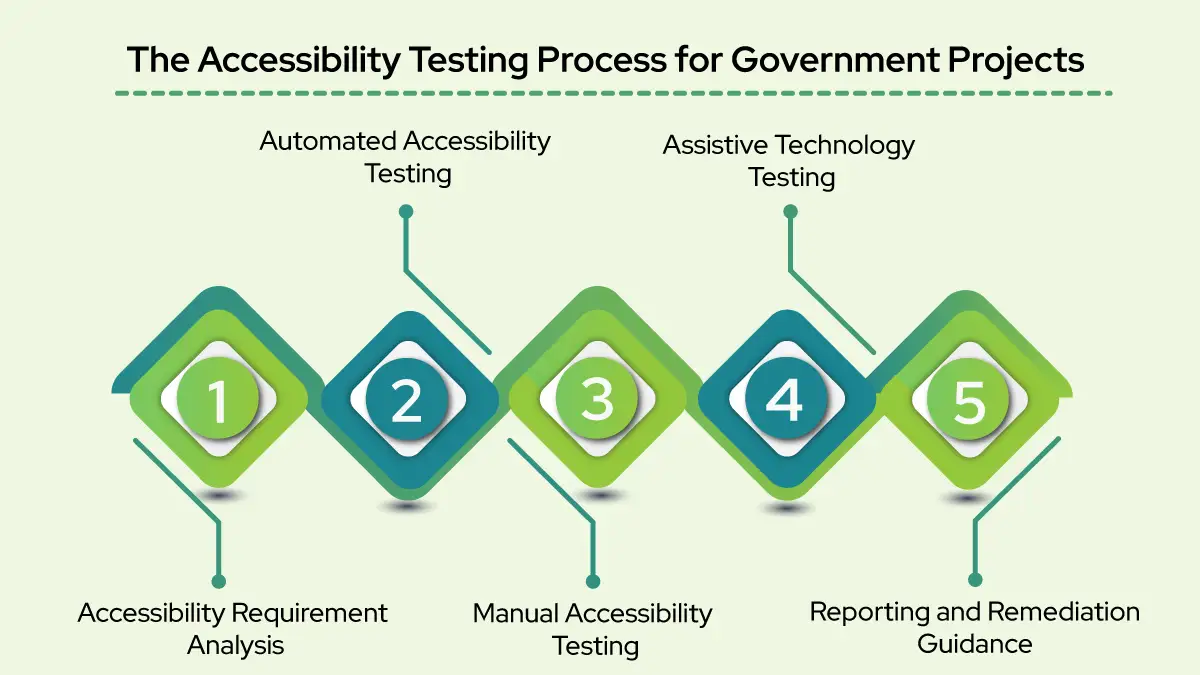
The Accessibility Testing Process for Government Projects
➢ Step 1 – Accessibility Requirement Analysis
By mapping relevant WCAG standards to the project scope and examining jurisdiction-specific compliance requirements, this stage focuses on establishing accessibility goals. Before accessibility testing services, it guarantees legal alignment and creates a clear accessibility roadmap.
➢ Step 2 – Automated Accessibility Testing
Automated testing uses specialized technologies to quickly find common accessibility problems, including structural flaws, contrast failures, or missing labels. This phase acknowledges the limitations of automation and the necessity of manual validation, even though it is effective for early detection.
➢ Step 3 – Manual Accessibility Testing
Real-world user interactions, such as keyboard-only navigation and screen reader compatibility with JAWS, NVDA, and VoiceOver, are assessed through manual accessibility testing. It identifies usability problems that automated technologies are unable to consistently identify.
➢ Step 4 – Assistive Technology Testing
This stage confirms that the platform is compatible with assistive technology like voice input tools, screen readers, and screen magnifiers. It guarantees consistent, accessible experiences across various assistive technology contexts, operating systems, and devices.
➢ Step 5 – Reporting and Remediation Guidance
Detailed audit reports that list issues in order of priority, compliance gaps, and severity are created using accessibility results. Effective problem-solving and continuous accessibility compliance are made possible for development teams by clear, practical guidelines.
Common Accessibility Issues Found in Government Websites
➱ Missing or inadequate alt text for images
Screen reader users cannot comprehend visual content when images lack meaningful alt text, which results in information loss and non-compliance with WCAG accessibility guidelines.
➱ Improper heading structure is disrupting screen reader navigation
Screen reader users are confused by incorrect or skipped header levels, which make it hard for them to understand site structure or content hierarchy and navigate pages effectively.
➱ Insufficient color contrast failing WCAG standards
Limited contrast between the backdrop and text makes it harder for those with limited vision to read and may result in accessibility issues according to WCAG contrast standards.
➱ Inaccessible PDFs and downloadable documents
Important government papers become inaccessible for screen readers and assistive technology users when they are unstructured PDFs that lack tags, intelligible language, or appropriate headings.
➱ Non-compliant form fields lacking proper labels and error messages
Users are unable to effectively and independently complete forms that lack accessible error warnings, clear labelling, or directions.
➱ Broken keyboard navigation and focus traps
When navigation breaks or concentration gets stuck, keyboard users encounter obstacles that make it hard to access content or finish tasks quickly.
Essential Accessibility Testing Tools for Public Sector Projects
⦿ Automated Testing Tools
Common WCAG flaws, including missing labels, contrast mistakes, and structural issues, can be swiftly identified with automated accessibility testing tools such as Axe DevTools, WAVE, Lighthouse, and Pa11y. This allows for quicker detection and early remedy during development cycles.
⦿ Browser Extensions and Auditing Tools
Through the real-time identification of accessibility breaches, browser-based accessibility extensions facilitate speedy audits throughout design and development. Before public sector accessibility testing, they enable teams to lower accessibility difficulties, enhance workflows, and check code modifications instantaneously.
⦿ Assistive Technology Tools
Assistive technology tools include voice input software, magnifying glasses, and screen readers such as JAWS, NVDA, and VoiceOver. By using these technologies, testers may evaluate true accessibility across a range of user demands and devices and replicate real user experiences.
Best Practices for WCAG Accessibility Testing in Public Sector Projects
➾ Shift-left testing: Integrate accessibility from design through development
By including WCAG standards early in the design and development process, shift-left accessibility testing minimizes rework, cuts expenses, and guarantees that inclusive experiences are incorporated into public sector platforms from the outset.
➾ Conduct accessibility testing during sprints, not just at the end
The accessibility testing agency teams may detect problems early, avoid regressions, and guarantee ongoing compliance by testing accessibility at each sprint rather than waiting for expensive changes at the end of the project.
➾ Perform regular audits to maintain ongoing compliance
As features, content, and technologies change, regular accessibility audits help government platforms stay WCAG-compliant, guaranteeing consistent user experiences and long-term accessibility.
➾ Document findings with clear, actionable accessibility reports
Clear accessibility reports help development teams identify, prioritize, and close accessibility gaps by outlining concerns, their severity, WCAG references, and remedial steps.
➾ Train internal teams on accessibility fundamentals
Providing accessibility basics training to internal teams raises awareness, enhances design and development procedures, and promotes long-term WCAG compliance for upcoming government digital projects.
Accessibility Testing Challenges in Government Projects
↠ Legacy systems and outdated technology stacks
Without significant modernization efforts, implementing WCAG compliance would be challenging, expensive, and time-consuming because many government platforms still use traditional technologies that were not made to be accessible.
↠ Complex workflows, multi-step forms, and citizen portals
Extensive testing is necessary to guarantee uniform navigation, clarity, and usability for all users on government websites, which frequently involve intricate, multi-step procedures that raise accessibility hazards.
↠ Budget constraints and competing project priorities
Accessibility projects may be delayed by limited funding and conflicting goals, which force teams to strike a balance between feature development, deadlines, resource availability, and compliance needs.
↠ Ensuring long-term accessibility compliance through platform updates
As platforms change over time, maintaining accessibility becomes more difficult and calls for constant testing, observation, and updates to avoid regressions during improvements or content modifications.
↠ Balancing automation with the need for human expertise
Human skill is necessary to assess actual user experiences, comprehend WCAG requirements, and properly handle complicated accessibility obstacles, even while automated technologies are adept at detecting simple faults.
How Accessibility Testing Supports Inclusive Digital Governance
◈ Building citizen trust through equitable access to services
By ensuring that all individuals, regardless of their physical, cognitive, or technological constraints, may access government services equitably, accessibility testing promotes transparency, trust, and confidence in digital platforms.
◈ Delivering better service outcomes for diverse user populations
For a variety of user groups using government digital channels, accessibility testing companies enhance job completion, satisfaction, and service efficiency by detecting and removing usability barriers.
◈ Aligning with digital transformation and modernization goals
By incorporating inclusive design into contemporary platforms, accessibility testing ensures that new technologies improve usability, scalability, and long-term accessibility compliance, thereby supporting digital transformation.
◈ Demonstrating commitment to social responsibility and inclusion
Setting accessibility as a top priority demonstrates a government’s dedication to equality, digital inclusion, and social responsibility, boosting public confidence and assisting with larger inclusion and equity programs.
Also Read: Top Security Testing Company in UK for Compliance and Data Protection
Choosing the Right Accessibility Testing Partner for Government Projects
➔ What to Look for in an Accessibility Testing Provider
• Proven experience with public sector compliance and WCAG standards
Select an accessibility testing agency that has a track record of working with public sector initiatives and is well-versed in WCAG standards, accessibility legislation, and regulatory compliance needs.
• Combined manual and automated testing capabilities
To identify both technical and practical usability obstacles, a successful accessibility partner combines automated methods with extensive manual testing.
• Clear, actionable reporting with remediation guidance
The ideal accessibility testing company provides thorough reports with concerns ranked by priority, concise justifications, and doable corrective actions that development teams can quickly put into practice.
• Understanding of government security and privacy requirements
In order to guarantee compliance without compromising sensitive data, accessibility testing providers need to be aware of government security, data protection, and privacy laws.
• Track record of delivering digital confidence in quality engineering
Reliable, easily accessible digital platforms that foster confidence, lower risk, and guarantee long-term quality engineering results are consistently delivered by a strong provider.
Ready to Ensure Your Public Sector Platform Is WCAG Compliant?
Most of the free web accessibility tools support determining if the web content conforms to the WCAG regulatory compliance. It’s necessary to understand that these tools depend on automation, which can’t address every error. Manual testing is crucial to managing your digital assets. It is a comprehensive section on assessing usability & accessibility testing.
Accessibility testing isn’t a checkbox, but it’s a standard that needs to be maintained in every stage. When you are focused on accessibility practices, you’re only enhancing your product values and making a difference in people’s lives. Talk with the expert at an accessibility testing company for consultation to audit your site accessibility.








Comments are closed.