

 by Mit Thakkar
Summarize this blog post with:


- List of Functional Testing Tools for End-to-End Software Quality Assurance
- What is Functional Testing?
- ➔ Types of functional testing:
- Role of Functional Testing in End-to-End QA
- Key Criteria for Selecting Functional Testing Tools
- ⇒ Ease of use and learning curve
- ⇒ Supported platforms (web, mobile, API)
- ⇒ Integration capabilities (CI/CD tools like Jenkins, GitHub Actions)
- ⇒ Test automation support
- ⇒ Reporting and analytics features
- ⇒ Cost (open-source vs paid)
- ⇒ Community and support
- List of Popular Functional Testing Tools
- 1. Selenium
- 2. Cypress
- 3. Playwright
- 4. TestComplete
- 5. Katalon Studio
- 6. Postman (for API Functional Testing)
- 7. SoapUI
- 8. Appium
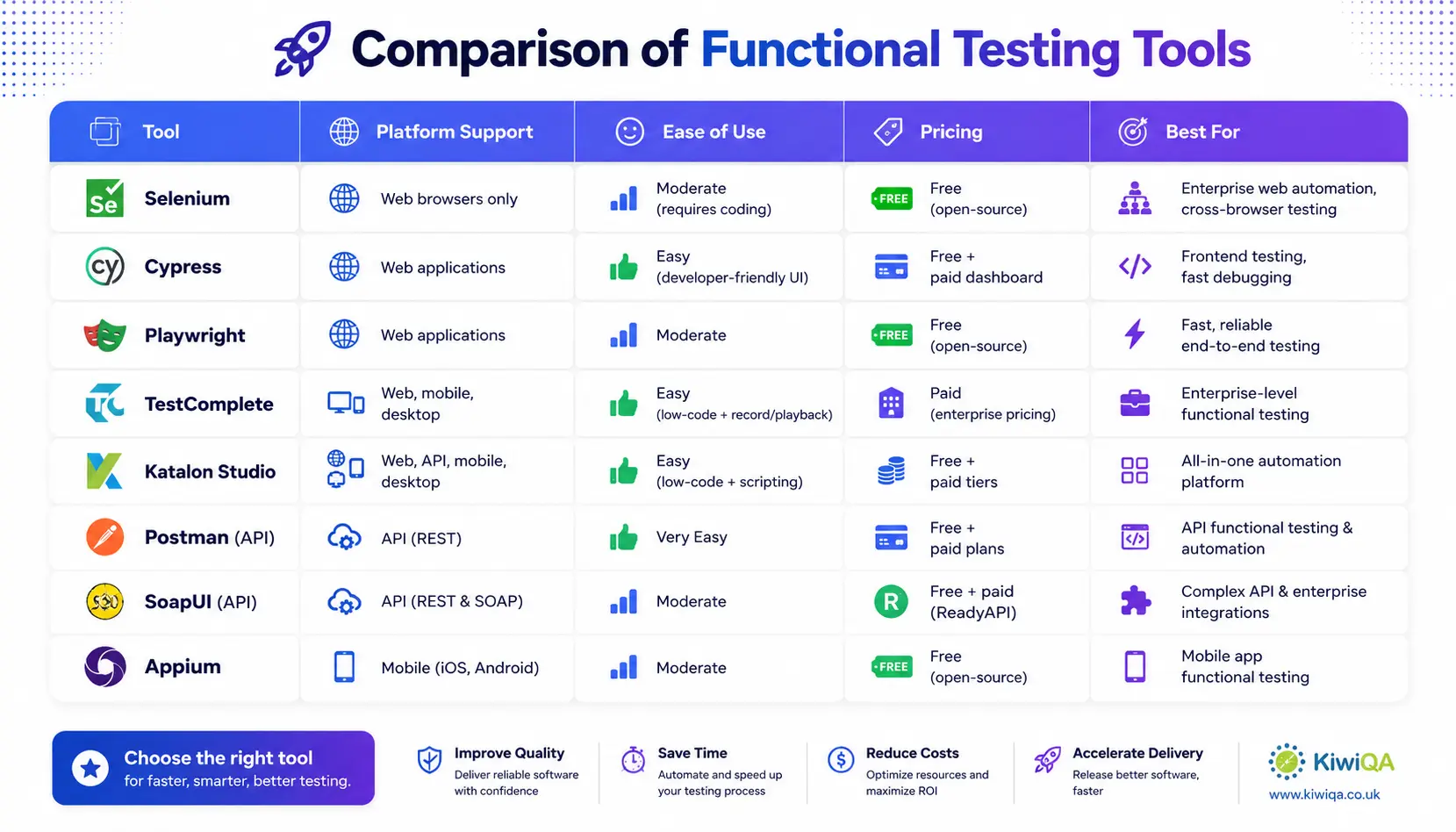
- Comparison of Functional Testing Tools
- Best Practices for End-to-End Functional Testing
- ➥ Design maintainable test cases
- ➥ Use data-driven testing
- ➥ Integrate with CI/CD pipelines
- ➥ Prioritize critical user journeys
- ➥ Regularly update test scripts
- Challenges in Functional Testing
- ◈ Test maintenance overhead
- ◈ Flaky tests
- ◈ Environment dependencies
- ◈ Time and resource constraints
- Future Trends in Functional Testing
- ✧ AI-powered testing tools
- ✧ Shift-left and shift-right testing
- ✧ Increased automation in DevOps pipelines
- ✧ Low-code/no-code testing solutions
- Ready to Choose the Right Functional Testing Tool?
List of Functional Testing Tools for End-to-End Software Quality Assurance
Modern enterprises are always under peak pressure to deliver top-notch products; however, the risk of releasing any web app without proper QA can have major implications. This is where functional testing helps to measure the reliability, quality, and performance of a web app. Firms seeking to leverage functional QA services for quick release can go through this blog to get detailed insights.
The strong automated testing platform that facilitates functional QA can enhance the testing process, efficiency, and precision. There are various functional testing tools used in a software testing company that can meet vast testing needs. As per the market reports, the worldwide AI in test automation market is expected to reach USD 3.4 billion by 2033.
The rapid growth demonstrates the reliance on AI-powered functional testing solutions to enhance accuracy and speed. The frequent development of AI allows smart test creation and self-healing capabilities, significantly driving the software quality and reliability. End-to-end comprehensive testing measures software quality.
However, most businesses struggle with E2E testing complexity. The following post presents those challenges and the best practices to navigate. We’ll also discuss the list of functional testing tools used by software testing companies. Before you get a brief, first explore the basics of functional testing and its role in QA.
What is Functional Testing?
This is a kind of black box QA testing service that is operated to drive the software quality. The following methods are used by the testing team to validate the functional demands of business apps. It verifies whether the software is working as per the user’s needs. Software functional testing validates all the demands of an app to ensure it has a smooth user interface, coherent API, and seamless integration with key business workflows.
It is used to measure whether the software is easy to access or navigate, or the reliability of the payment gateway. Now, testing teams are using automated functional QA tools for automatic test case executions to save time. These are designed for validating the app’s functionality and offering consistent and accurate software performance.
➔ Types of functional testing:
• Unit testing- This software testing and QA service is used to prioritize testing individual components in isolation. It verifies each unit performs as expected, supports developers to detect bugs early, and manages code quality effectively.
• Integration testing- Integration testing validates how various modules work together. It identifies errors in data flow, communication, and interaction between integrated units to manage seamless functionality across systems.
• System testing- system testing QA determines the complete app to determine whether the product meets specific demands. The testing verifies that all components work together accurately in fully integrated workflows.
• Acceptance testing- The following testing is used to validate the app against business demands and user expectations. It is mostly performed by the end users or stakeholders to validate whether the system is ready for deployment.
Role of Functional Testing in End-to-End QA
Functional QA plays a strong role in E2E testing by validating that each feature of the app works as expected within real user workflows. In E2E testing, functional QA validates that individual modules and integrated systems perform accurately. It is used to measure components such as data processing, user login, and transactions. It acts as the foundation layer that verifies organization logic before and during full workflow execution.
The key benefit of web application testing services is enhanced user experience, as it verifies that all features behave consistently under real-world conditions. It also allows early error detection by identifying errors during development stages, minimizing the cost and effort required to repair the gaps. Additionally, it supports limiting production errors by validating the crucial path before release, ensuring a smooth release.
For example, in an e-commerce app, functional testing determines whether a user can browse products, add items to the cart, and complete payment without errors. When integrated into E2E workflows, it verifies the seamless user journeys and purchasing experience.
By integrating functional testing into comprehensive QA testing services, firms can obtain improved reliability, performance, and user satisfaction across their application.
Key Criteria for Selecting Functional Testing Tools
⇒ Ease of use and learning curve
This is a crucial factor to look for when selecting the functional QA testing service tool. It can directly impact team productivity and adoption. Tools that have an intuitive interface, ease documentation, and simple workflows can limit onboarding time and training efforts. A smooth learning curve can slow down the implementation and specialized skills. The selection of a tool that aligns with the team’s technical expertise verifies quick test creation and smooth execution. It helps to enhance efficiency across the testing lifecycle.
⇒ Supported platforms (web, mobile, API)
The functional testing tools you select must support the platforms that are relevant to apps. Cross-platform compatibility assures consistent testing across various environments and user devices. Some tools specialize in web testing, whereas others support mobile & API testing. Choosing a tool that matches your app’s technology stack helps avoid limitations and ensures comprehensive validation of functionality across platforms.
⇒ Integration capabilities (CI/CD tools like Jenkins, GitHub Actions)
A good functional testing tool must seamlessly integrate with the tools mentioned above to automate test execution. It allows early error detection and quick feedback, enhancing collaboration between the development & QA team. The strong integration capabilities allow testing to become a necessary part of advanced workflows rather than time-consuming activities.
⇒ Test automation support
Choose a tool that supports automation, since it plays a major role in enhancing testing efficiency and scalability. Automation supports limited manual efforts, drives the testing cycle, and serves consistent outcomes. It is necessary in an Agile & DevOps environment where frequent releases demand validations. Select a tool that has strong automation capabilities, allowing the team to manage complicated test scenarios effectively and manage software quality.
⇒ Reporting and analytics features
Choose a software functional testing tools that offer effective reporting and analytics. This feature supports the team to track test execution, manage errors, and measure quality metrics. The quality testing tool must offer detailed reports, insights, a dashboard, and performance trends. These insights allow improved decision-making and quick error resolutions. Modern analytics can highlight patterns and support the team in enhancing testing practices. Comprehensive reporting verifies transparency and drives communication among stakeholders.
⇒ Cost (open-source vs paid)
This is another important factor to look for when making a choice for a functional QA tool. The open-source tools are cost-effective, but they might demand additional efforts for setup, support, and maintenance. The paid tools offer advanced functionalities, support, and seamless integration. However, these tools come with a licensing fee. Firms must determine the total cost of ownership that involves scalability, training, and maintenance. Balancing all these features with the budget and selecting the tool that delivers maximum value.
⇒ Community and support
Most of the popular functional testing tools have strong user communities, broad documentation, and tutorials that help resolve queries quickly. Paid tools also offer dedicated user support and frequent updates. Reliable support ensures smooth implementation, quick troubleshooting, and frequent improvement. Select a tool that has a strong community presence, limits dependency, and enhances testing efficiency.
Also Read: List of Security Testing Services UK Businesses Should Consider
List of Popular Functional Testing Tools
1. Selenium

One of the most popular frameworks available for free is Selenium. It is used to automate a web browser. Java, Python, C#, and Ruby are just a few of the programming languages it supports, so your team can develop tests in the language they already know. This application can be used by teams with strong coding and scripting skills who want complete control for browser-based functional automation.
Cross-browser testing, parallel execution, and robust community support are among its salient characteristics. Scalable automation is made possible by Selenium’s easy integration with a variety of frameworks and CI/CD technologies. It works well for creating reliable web automation frameworks, particularly for big projects.
2. Cypress

Cypress, the premium QA tool, provides quick execution and immediate reloading. It enables developers to view test results immediately. Cypress makes test creation and debugging easier, thanks to built-in debugging and a straightforward user interface. It runs directly in the browser, giving you more control over program behavior. Cypress is best suited for JavaScript-heavy apps, particularly those developed with current frameworks. For projects where speed, accuracy, and usability are crucial for effective testing operations, the team can choose this.
3. Playwright

Microsoft developed Playwright, an end-to-end testing platform that allows for reliable browser automation. It supports testing across several browsers, providing consistent findings. Auto-wait capabilities, parallel processing, and multi-programming language support are among the key characteristics. Playwright excels at managing dynamic content and advanced user interactions. It is ideally suited for dependable end-to-end automation, especially in modern applications where cross-browser compatibility is critical to quality software delivery.
4. TestComplete

TestComplete is a commercial automation solution used for validating apps on various platforms. It can perform both scripted and scriptless testing, making it appropriate for users with and without technical knowledge. Recording and playback capabilities, object recognition, and connection with CI/CD systems are all key aspects. TestComplete includes powerful reporting and analytics features for a better understanding of test outcomes. It is ideal for enterprises that deal with powerful testing solutions. It offers scalability and support for complex applications on numerous platforms.
5. Katalon Studio

The following QA tool handles testing on broad platforms. It includes pre-designed templates and a simple setup process, making it suitable for both beginners and professionals. For greater versatility, the platform supports both low-code and complex scripting. Katalon also provides integrated reporting and CI/CD support. It is ideal for teams seeking a tool with a simple interface and wide potential.
6. Postman (for API Functional Testing)

Postman is a common API functional testing tool that is used to create, test, and automate API operations. It delivers a smooth interface for submitting queries, analyzing responses, and authenticating endpoints. Automated API testing, data management, and seamless CI/CD integration are among the key features. Postman encourages teamwork, making it simpler to manage API development and testing procedures. It is best suited for backend and API validation, ensuring seamless communication.
7. SoapUI

SoapUI is the best functional testing tool created exclusively for SOAP and REST APIs. It offers data-driven testing, which allows testers to check several scenarios with various data sources. Advanced security testing extensions, load testing capabilities, and extensive reporting are among the most notable features. SoapUI is extremely successful for validating complex integrations and enterprise-level services. It’s a good choice for firms working in broad API ecosystems that necessitate rigorous testing.
8. Appium

Appium is a free functional automation testing tool that automates apps on iOS and Android. It supports a wide range of coding languages, which ultimately delivers team flexibility. Testing vast platforms, interaction with current frameworks, and supporting a broad choice of platforms are crucial characteristics. Appium enables testers to reuse code across platforms, saving both work and time. It is ideal for testing mobile applications, especially when consistency, scalability, and cross-device compatibility are critical needs.
Comparison of Functional Testing Tools
Best Practices for End-to-End Functional Testing
➥ Design maintainable test cases
Developing a managed test case verifies long-term efficiency and scalability in end-to-end functional testing. Avoid complex coding and keep test logic separate from test data. The well-documented test cases support the team to quickly understand and modify scripts as apps evolve. The following approaches minimize maintenance efforts while delivering consistent quality outcomes.
➥ Use data-driven testing
Data-driven QA enables testers to run the same test cases with various data sets, enhancing coverage and accuracy. Store test data externally using spreadsheets, databases, and JSON files to drive flexibility. This method limits script duplications and verifies improved validations of various scenarios, including edge cases. It also supports simulating real-world user inputs effectively. Experts also integrate data-driven practices to strengthen automation practices and drive the reliability of QA across diverse user conditions.
➥ Integrate with CI/CD pipelines
Integration of functional testing with CI/CD pipelines verifies continuous quality validation throughout the SDLC. Automated tests must run with every commit, allowing early detection of defects. The QA team uses advanced tools to streamline the process. The integration limits manual effort, drives release cycles, and promotes collaboration between the development and QA teams. It also verifies testing remains aligned with rapid deployment practices and evolving app updates.
➥ Prioritize critical user journeys
Prioritizing crucial user journeys verifies that the most necessary functionalities are always tested first. Identify key workflows that directly hamper user experience and business outcomes. Testing these paths thoroughly limits the chances of crucial breakdowns in production. The prioritization supports optimization of testing efforts, especially under tight deadlines. By concentrating on high-impact scenarios, the QA team can deliver reliable and effective outcomes.
➥ Regularly update test scripts
Frequent updates of test scripts are necessary to keep pace with the app changes and evolving demands. As features are upgraded, outdated scripts can cause false results or missed errors. Schedule the periodic reviews to redefine and optimize test cases. Remove redundant scripts and upgrade locators, data sets, and workflows as required. The proactive practices ensure accuracy and manage the effectiveness of automated testing over time.
Also Read: Top 11 Insurance App & Software Testing Companies in the UK (2026 Edition)
Challenges in Functional Testing
◈ Test maintenance overhead
The biggest challenge in functional testing is the maintenance of test scripts as the app evolves. Frequent modifications in UI, feature updates, and changing workflows often demand script modifications. Poorly structured test cases improve maintenance effort and limit testing cycles. The team must invest time to review, update, and optimize scripts to verify continued accuracy. Without maintenance practices, outdated tests can limit testing efficiency.
◈ Flaky tests
These tests generate inconsistent outcomes without changing the actual code. These unreliable outcomes occur due to timing errors and insufficient synchronization. Flaky tests limit the trust in automation frameworks and make it tough for the team to monitor real gaps. Navigating this complexity demands a stable test design, improved strategies, and environmental consistency. Frequent script optimization verifies reliable outcomes.
◈ Environment dependencies
Functional QA heavily relies on stable and poorly configured test environments. Differences in OS, Browsers, APIs, or server configurations can create unexpected failures. Shared environments may cause conflicts when various teams perform testing simultaneously. These dependencies make it tough to isolate errors and validate app behavior accurately. Create standardized testing environments and maintain consistent configuration. Following these practices helps to limit disruptions and offer reliable execution.
◈ Time and resource constraints
Limited resources and time often create challenges for thorough functional testing. Tight schedules of development may force the team to limit test coverage or skip necessary scenarios. Insufficient testing, infrastructure limitations, and a lack of automation expertise hamper quality assurance efforts. Balancing speed with accuracy becomes necessary when releases are frequent. Effective prioritization, automation, and resource allocation are necessary to navigate these complexities.
Future Trends in Functional Testing
✧ AI-powered testing tools
The AI-driven testing tools are revolutionizing functional testing by allowing smart automation and quick error detection. These tools use ML to measure patterns, predict failures, and craft self-healing test scripts. They minimize manual intervention and enhance test accuracy over time. AI also drives test coverage by identifying risk areas and generating smart test cases. The modern function QA tools support teams to deliver quality apps with improved efficiency and limited testing cycles.
✧ Shift-left and shift-right testing
The following modern practices focus on expanding testing across the complete development lifecycle. Shift-left emphasizes early testing during development to track defects sooner, limit costs, and rework. On the other side, shift-right testing involves testing in production with real-time metrics & tracking tools. By blending these practices together, businesses can enhance software quality, user experience, and regular feedback. The future of functional testing enables teams to track errors quickly and manage app performance after release.
✧ Increased automation in DevOps pipelines
Automation is becoming a major component of DevOps pipelines, allowing faster and more reliable software delivery. Functional tests are increasingly integrated into automated workflows to ensure frequent validation with every code change. The trend limits manual effort, drives release cycles, and enhances collaboration between the development & QA team. With automated pipelines, firms can obtain consistent quality checks, frequent feedback, and releases. These practices make testing a crucial component for advanced continuous integration and delivery practices.
✧ Low-code/no-code testing solutions
The following future trends in functional testing solutions are gaining popularity by making automation accessible to non-technical users. These platforms deliver a visual interface, drag-and-drop features, and minimal scripting needs. The trend allows business analysts and the QA team to craft & execute tests. They limit dependency on specialized coding skills and speed up test creation. As firms seek quick delivery and broad team involvement, the tools support democratized QA while managing efficiency and scalability in the functional QA process.

Ready to Choose the Right Functional Testing Tool?
Validating your app works flawlessly is the top priority. Functional QA tools are necessary to catch bugs and enhance software quality. It helps to save QA experts’ time and limits the challenges of manual testing. We have shared the best reviewed functional testing tools in this blog. You can find the insights about the tools, their use cases, benefits, and how they fit with your organizational needs. Whether you are a developer or a business, this guide helps you to make informed decisions about tools that can elevate your testing process.
Picking the ideal tool directly hampers the product performance and quality you are going to serve to users. It determines whether the product operates as intended. Before going live, these tools ensure every update gets accurately validated. Each tool contains unique functionalities, and the ideal selection must be based on your team and the project demands. If you are looking for a solution that helps your QA team save time, talk with the QA testing service experts.










Comments are closed.