

 by niranjan.limbachiya@kiwiqa.com
Summarize this blog post with:


- Complete Mobile App Performance Testing Checklist for 2026-27
- What Is Mobile App Performance Testing?
- Mobile App Performance Testing Best Practices
- ➥ Start Testing Early in the Development Lifecycle
- ➥ Test on Real Devices
- ➥ Automate Performance Testing
- ➥ Monitor Performance After Deployment
- Complete Mobile App Performance Testing Checklist for 2026-27
- ☑ App Launch and Installation Performance Testing
- ☑ Load Testing for Mobile Applications
- ☑ Stress Testing
- ☑ Response Time Testing
- ☑ Network Performance Testing
- ☑ Battery Consumption Testing
- ☑ Memory Performance Testing
- ☑ CPU and GPU Performance Testing
- ☑ Database Performance Testing
- ☑ API Performance Testing for Mobile Apps
- ☑ Device Compatibility Performance Testing
- ☑ Operating System Performance Testing
- ☑ User Interface Performance Testing
- ☑ Security Impact on App Performance
- ☑ Background Process Testing
- Mobile App Performance Testing Process
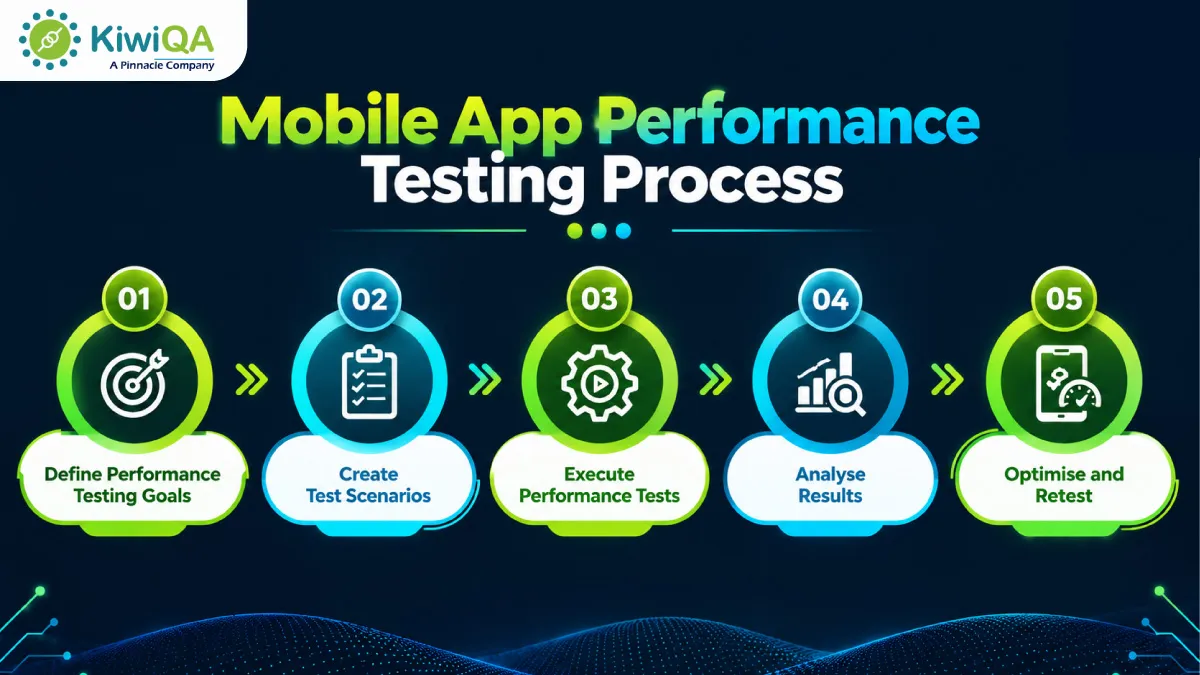
- ➜ Step 1: Define Performance Testing Goals
- ➜ Step 2: Create Test Scenarios
- ➜ Step 3: Execute Performance Tests
- ➜ Step 4: Analyse Results
- ➜ Step 5: Optimise and Retest
- Future Trends in Mobile App Performance Testing for 2026-27
- ⮞ AI-Powered Performance Testing
- ⮞ Continuous Performance Testing
- ⮞ Cloud-Based Testing Platforms
- ⮞ Real User Monitoring (RUM)
- Ready to Optimise Your Mobile App Performance?
Complete Mobile App Performance Testing Checklist for 2026-27
Mobile users want apps that work smoothly, run fast, and perform consistently across devices and network conditions. According to Luciq’s 2026 report, 83.4% of users consider app stability extremely or very important, while 15.4% would uninstall an app after a single crash. Poor performance can therefore lead to lower retention, negative reviews, lost revenue, and damage to brand reputation.
Google reports that 53% of mobile site visits are abandoned when a page takes more than 3 seconds to load, highlighting the necessity of speed. Mobile application testing services allow businesses to identify performance gaps early, improve stability, and deliver an improved user experience. Performance testing also supports stable releases by identifying errors before they hamper businesses and customers.
What Is Mobile App Performance Testing?
Mobile app performance testing determines how well the application performs against various usage conditions. The mobile app testing service aims to manage speed, stability, resource usage, responsiveness, and reliability. Functional testing checks whether an app feature works as expected, whereas performance testing checks how effectively they work. Performance testing allows identifying slow responses, memory issues, crashes, and other errors. By addressing these problems before release, organizations can improve app quality, user experience, and application reliability. To know more, read the following mobile app performance testing checklist.
Mobile App Performance Testing Best Practices
➥ Start Testing Early in the Development Lifecycle
Early performance testing is considered as the mobile app performance testing best practices. It helps in finding problems before they are put into production. Later on, it may be more difficult to resolve resource issues, slow displays, inefficient code, and API delays. Incorporating performance tests into the development process simplifies troubleshooting and lowers future expenses. When new features and upgrades are added, it also helps teams maintain consistent performance.
➥ Test on Real Devices
A more accurate view of regular app performance is given by real devices. Processors, memory, battery life, screen sizes, and hardware capabilities differ among phones. Testing under these circumstances might reveal problems that emulators would miss. Expert application testing services may assist in providing a more uniform user experience across various mobile settings and allow broader device coverage.
➥ Automate Performance Testing
Automated performance testing facilitates frequent performance reviews and lessens repetitive human labor. Response times, resource consumption, load behavior, and other crucial metrics may all be monitored via automated testing. Additionally, they may be used in processes for continuous testing. This helps maintain consistent application quality across the development lifecycle and identify performance changes between builds.
➥ Monitor Performance After Deployment
After the program is released, performance monitoring should be done. The devices, networks, traffic volumes, and use patterns experienced by real users could differ from those examined during testing. Data on actual user performance might identify unforeseen delays and new problems. Through frequent optimization and performance upgrades, ongoing monitoring helps teams comprehend these problems to improve the application experience.
Also Read: Complete Functional Testing Checklist Before Software & App Release
Complete Mobile App Performance Testing Checklist for 2026-27
Take a look to the below Mobile Application Performance Testing Checklist-
☑ App Launch and Installation Performance Testing
The speed at which a mobile app installs, updates, and becomes operational is the main focus of app launch and installation performance. A slow startup may result in user drop-offs and have an impact on the initial impression. Installation, app updates, and launches are all covered in this section. A faster and more reliable user experience can be achieved by easy installation and fast launch times.
☑ Load Testing for Mobile Applications
A performance testing checklist for web application can check how applications perform when numerous users access it simultaneously is tested via load testing. It covers common tasks like logging in, searching, browsing, paying, and requesting data. Response speed, system stability, and error rates under anticipated user loads are the primary concerns. Finding server or application limitations is another benefit of this testing. When user activity rises, a well-performing app should stay steady.
☑ Stress Testing
The focus of stress testing is on how well an application performs under unusual operating circumstances. The web application performance testing checklist assists in determining how the application responds to excessive traffic, requests, or data volumes. Slow answers, crashes, unsuccessful queries, and resource depletion are typical problems. After severe load conditions, a mobile app should be able to resume normal operation without losing crucial data.
☑ Response Time Testing
Response time testing performed by mobile app testing company measures how fast an application responds to system requests and user actions. It includes tasks like accessing screens, logging in, finding information, filling out forms, and loading data. Even a feature-rich application can feel slow due to delays. Device and network circumstances might also affect response time. It improves overall app usability and contributes to a more seamless experience.
☑ Network Performance Testing
App behavior under various connection situations is the main focus of network performance testing. During regular use, mobile users may alternate between inferior networks, 4G, 5G, or Wi-Fi. Inadequate connectivity may result in incomplete data loading, unsuccessful queries, or delays. Temporary connection loss and network modifications are also covered in this testing area. The smooth operation of key app functionalities is made possible by strong network performance.
☑ Battery Consumption Testing
Battery consumption testing examines how much power a mobile application consumes when used frequently and for extended periods of time. Battery consumption may be increased by features like GPS, notifications, location tracking, video playback, and background synchronization. Overuse of power can negatively impact user experience and result in the removal of a program. Performance testing helps in identifying tasks that use a lot of resources. The program can operate longer without putting excessive load on the battery through efficient battery utilization.
☑ Memory Performance Testing
The effectiveness of an application’s utilization of device RAM is the primary focus of memory performance testing. An app that uses a lot of memory may become slower and might crash on smartphones. Another frequent concern, particularly during extended sessions, is memory leakage. Memory utilization across displays, features, and repetitive tasks is all covered in this section. Stable memory usage promotes more seamless operation and keeps the program dependable over time.
☑ CPU and GPU Performance Testing
How well a mobile application manages processing and visuals is influenced by CPU and GPU performance. Resource utilization can be increased by complex graphic elements, image processing, video content, and heavy animations. In addition to producing heat, high CPU or GPU activity can shorten battery life. These resource-intensive locations can be found with the use of performance testing. Screen responsiveness, animation quality, and the overall mobile device experience are all improved by balanced processing.
☑ Database Performance Testing
The speed at which an application retrieves and manages data is directly impacted by database performance. Screens, searches, filters, and other data-driven elements may be delayed by slow queries. Reading, writing, updating, and deleting data are all covered in this section. Large data quantities and frequent database requests are also taken into account. Faster application responses and shorter wait times are two benefits of efficient database operations.
☑ API Performance Testing for Mobile Apps
Mobile apps are connected to servers and outside services via APIs. The speed at which app data shows on the screen can be directly impacted by their performance. Response time, request handling, errors, timeouts, and data transfer are the main topics of API performance testing. Mobile data use and loading times might also be increased by large or unnecessary answers. Applications can transmit data more quickly and give users a more seamless experience when their APIs are optimized.
☑ Device Compatibility Performance Testing
Numerous devices with varying CPUs, RAM, screen sizes, and hardware capabilities may run mobile apps. Performance testing for device compatibility examines how these variations impact the stability and speed of apps. While older or less expensive devices can have delays, high-end devices might be able to handle demanding features with ease. Hardware-related problems can be identified by comparing performance across device types.
☑ Operating System Performance Testing
The performance of a mobile application might be impacted by operating system versions. Releases for iOS and Android may bring about modifications to system resources, memory management, background activities, and permissions. Finding these variations is supported by performance testing across supported OS versions. App behavior upon operating system changes is also covered. Maintaining stability and preventing issues that could only arise on particular OS environments depend on consistent performance across supported versions.
☑ User Interface Performance Testing
The speed with which visual components react to user input is the main focus of user interface performance testing. An app may appear unresponsive if it has lost animation frames, slow screen transitions, and delayed buttons. Performance may also be impacted by complicated layouts and displays with a lot of images. UI performance testing helps in detecting these problems. A responsive interface facilitates navigation and improves user experience on various devices.
☑ Security Impact on App Performance
Mobile applications may occasionally take longer to process due to security features. Response times may be impacted by encryption, authentication, secure API connectivity, and other limitations. This balance between performance and protection is examined by security impact testing. Understanding how security restrictions affect application performance is the goal, not lowering them. Effective security implementation may safeguard user information while maintaining the responsiveness of crucial app features.
☑ Background Process Testing
Activities that take place when the program is not in use are referred to as background process performance testing. Notifications, data synchronization, location updates, and scheduled tasks are a few examples of these. Poorly controlled background activities could drain memory, increase battery consumption, or impair device performance. The speed at which the application restarts is another factor taken into account in this testing area. Maintaining performance without consuming extra device resources is made possible by effective background processing.
Mobile App Performance Testing Process
➜ Step 1: Define Performance Testing Goals
Based on the technical and business needs of the application, an Application Performance Testing Checklist begins with specific objectives. Faster reaction times, consistent performance, reduced resource consumption, and consistent functioning under various workloads are a few examples of these objectives. Testing teams have a clear foundation for assessment thanks to measurable criteria. Additionally, they assist companies in maintaining application quality throughout development and release cycles and in the early detection of performance gaps.
➜ Step 2: Create Test Scenarios
An App Performance Testing Checklist covers important user journeys and business functions within the application serve as the foundation for test scenarios. Login, product browsing, purchases, searches, and data submission are a few examples of these. Various workload scenarios help in demonstrating peak and expected consumption. Testing teams can detect performance concerns that could impact users, operations, or business processes. They use well-defined scenarios, which also provide a realistic perspective of application behavior.
➜ Step 3: Execute Performance Tests
Based on the needs of the application and anticipated usage trends, performance tests are performed. Testing for load, stress, network, battery, memory, and response time provides important performance information. Metrics like response time, resource consumption, mistake rates, and system stability are among the outcomes. Teams can use these insights to better evaluate how well the application can meet business needs and real-world usage.
➜ Step 4: Analyse Results
To find inefficiencies and locations that could compromise application reliability, performance results are examined. Problems may arise in databases, networks, application code, APIs, or device resources. Teams can identify the underlying causes of performance issues by analyzing these findings. Additionally, it helps lower the chance that consumers will experience performance problems after release.
➜ Step 5: Optimise and Retest
The application is optimized based on the results after performance problems are found. Code, databases, APIs, infrastructure, and resource management can all be improved. After that, retest and compare the revised outcomes with previous benchmarks. This verifies whether performance has improved and whether any new problems have been introduced. As the product develops, the cycle maintains consistent application performance and encourages constant improvement.
Also Read: Security Testing for SaaS Products: A CTO’s Checklist
Future Trends in Mobile App Performance Testing for 2026-27
⮞ AI-Powered Performance Testing
AI makes performance testing more data-driven and quicker. Large performance datasets may be analyzed, unusual behavior can be found, and automated test development is supported by AI-powered technologies. Additionally, predictive analysis can identify possible limitations before they become serious problems. As a result, testing teams can identify issues more quickly, cut down on tedious tasks, and improve overall application performance.
⮞ Continuous Performance Testing
Performance checks are integrated into the routine development and delivery process through continuous performance testing. Teams may evaluate performance across various builds and releases by integrating with DevOps workflows. Continuous insight into the behavior of applications can be obtained by real-time monitoring. This strategy helps businesses in identifying and resolving problems before they affect users broadly.
⮞ Cloud-Based Testing Platforms
Platforms for cloud-based testing offer adaptable configurations to evaluate the performance of mobile applications. Without having to maintain large physical device labs, teams can access various devices, operating systems, and settings. Scaling testing with project requirements is also made simpler by cloud infrastructure. In addition to lowering the time and resources required to run testing environments, this flexibility allows for wider device coverage.
⮞ Real User Monitoring (RUM)
The performance of an application for real users in real-world circumstances is the primary focus of real user monitoring. It can record data on user interactions, network conditions, device performance, and loading times. These revelations provide us with a better understanding of problems that controlled testing would miss. This data can be used by businesses to find performance gaps and make well-informed improvements to the application experience.

Ready to Optimise Your Mobile App Performance?
A well-tested mobile app delivers quick responses, improved stability, and a smooth user experience. The expert mobile testing service provider helps to identify performance gaps across devices and networks. Frequent performance testing improves reliability, speed, and scalability. They help businesses deliver a consistent experience and manage customer satisfaction as user expectations grow.










Comments are closed.