
 by Mit Thakkar
Summarize this blog post with:


- Complete Functional Testing Checklist Before Software & App Release
- What Is Functional Testing?
- Why Functional Testing Is Important Before Release
- ❉ Validates business requirements
- ❉ Identifies critical defects
- ❉ Improves user experience
- ❉ Reduces production risks
- ❉ Builds release confidence
- Functional Testing Preparation Checklist
- ➤ Review Requirements
- ➤ Prepare the Test Environment
- ➤ Prepare Test Cases & Test Data
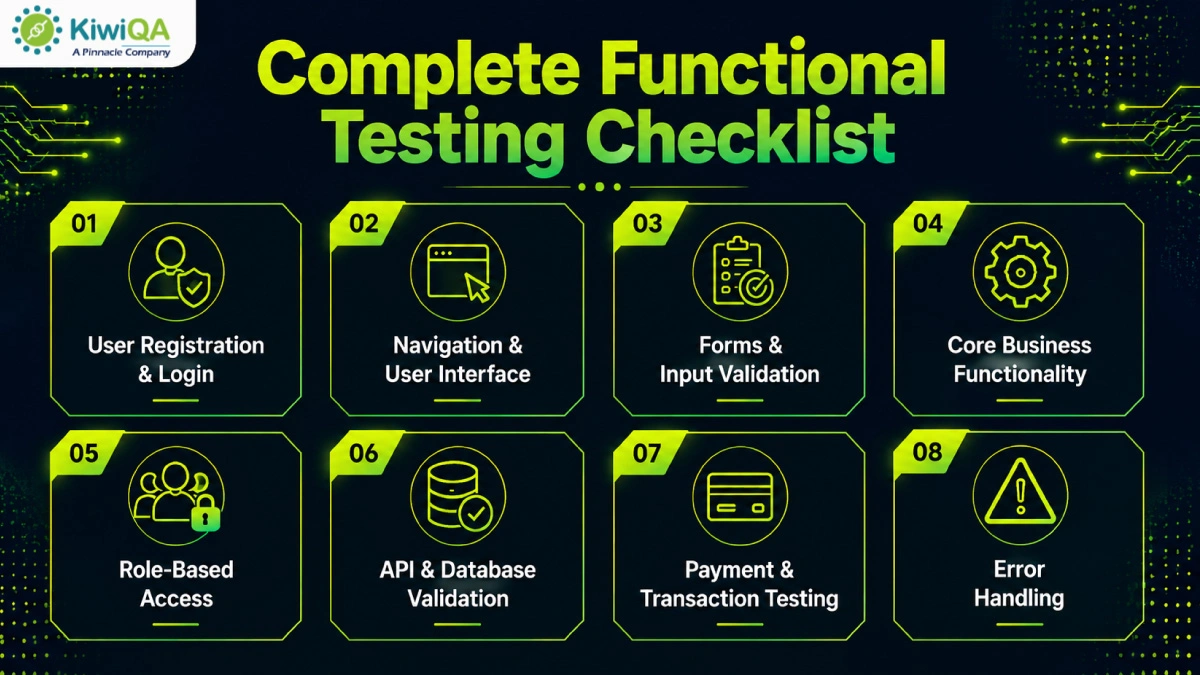
- Complete Functional Testing Checklist
- ❉ User Registration and Login
- ❉ Navigation and User Interface
- ❉ Forms and Input Validation
- ❉ Core Business Functionality
- ❉ Role-Based Access
- ❉ Search, Filter and Sorting
- ❉ API and Database Validation
- ❉ File Upload and Download
- ❉ Notifications
- ❉ Payment and Transaction Testing
- ❉ Third-Party Integrations
- ❉ Error Handling
- Common Functional Testing Mistakes
- ➤ Testing only positive scenarios
- ➤ Ignoring edge cases
- ➤ Using limited test data
- ➤ Skipping integration testing
- ➤ Avoiding regression testing
- ➤ Releasing with unresolved critical defects
- Best Practices for Functional Testing
- ❉ Start testing early
- ❉ Focus on high-risk features
- ❉ Use realistic test data
- ❉ Combine manual and automated testing
- ❉ Maintain requirement traceability
- ❉ Update test cases regularly
- Ready to Release Your Software Without Functional Risks?
Complete Functional Testing Checklist Before Software & App Release
Broken elements and unexpected errors can hamper user experience. It could damage the brand reputation and cause lost revenue. Here, functional testing comes to the rescue of your app’s integrity! It validates that every component of the web app performs accurately. However, to automate the process, a comprehensive functional testing checklist is required. The QA testing services checklist ensures an organized and clear approach for the QA team.
Functional testing is one of the most critical phases of the software development lifecycle because it verifies that every feature works exactly as intended from the end user’s perspective. According to the 2024 Consistency in Testing Report by BrowserStack, 58% of teams identify bugs late in the development cycle, leading to delayed releases and increased development costs. Whether you’re launching a web application, mobile app, or enterprise software, following a structured functional testing checklist helps identify defects early, reduce release risks, and ensure a seamless user experience. This guide outlines the essential checkpoints every QA team should complete before software deployment.
What Is Functional Testing?
The software testing company performs functional testing, which focuses on the app’s behavior from a user’s perspective, ensuring the app fulfills its purpose. Functional testing verifies that an app and its features are working accurately. The goal is to offer a secure & reliable experience by ensuring that all the features are working correctly.
Why Functional Testing Is Important Before Release
❉ Validates business requirements
Functional software testing and QA services confirm every feature works based on defined business goals and user expectations. It ensures the app delivers the desired functionality before release and limits misunderstandings and implementation errors.
❉ Identifies critical defects
Web application testing services uncover functional errors before software reaches production. Evaluating crucial errors early limits costly fixes, avoids app failures, and verifies that crucial organizational processes operate without unexpected errors.
❉ Improves user experience
The organized functional checklist template offers smooth navigation, accurate functionality, and reliable performance. Functional QA limits user frustrations, drives customer satisfaction, and offers a consistent digital experience across devices.
❉ Reduces production risks
Detecting & resolving errors before deployment lowers the chances of system breakdowns and business interruptions. Functional QA testing service safeguards operations while limiting financial, operational, and reputational risks.
❉ Builds release confidence
Comprehensive functional QA gives stakeholders confidence that the app is stable, reliable, and ready for production. It ensures critical features are performed as expected and allows a confident release.
Also Read: Top Functional Testing Company in UK for End to End Testing Solutions
Functional Testing Preparation Checklist
➤ Review Requirements
Before testing begins, check the functional requirements and business goals. Verify that each functional specification is precise, comprehensive, and in line with the company’s goals. Determine expected outcomes for every feature to remove any doubt during implementation. By collaborating with experienced software testing and QA services providers, requirement gaps can be found early, and costly issues can be avoided later. A thorough requirement assessment guarantees that test cases are complete, relevant, and able to successfully validate expected application behavior.
➤ Prepare the Test Environment
To get accurate testing results, design a test environment that mimics the development environment. Before execution starts, set up the necessary hardware, software, OS, browsers, databases, and network configurations. Verify the availability and proper operation of third-party integrations, APIs, and supporting services. Ensure that the environment doesn’t change during testing to avoid inconsistent results. When an environment is set up correctly, testers can find real functional problems without being distracted by infrastructure-related difficulties.
➤ Prepare Test Cases & Test Data
For each functional need, create thorough test cases that address boundary, exception, positive, and negative scenarios. Ensure that every test case has precise execution instructions, expected results, and acceptance standards. Create diverse, validated, and realistic test data that closely resembles actual business situations. Incorporate duplicate records, invalid inputs, and edge cases to confirm how the program behaves in various scenarios. Defect identification and overall testing efficacy are greatly enhanced by well-organized test cases and high-quality data.
Complete Functional Testing Checklist
❉ User Registration and Login
Make sure users are able to register, log in, log out, reset their passwords, and authenticate using the supported methods. Verify that valid users receive secure access, whereas restricted users receive an error message. This step of the functional testing checklist guarantees a seamless onboarding process across various browsers and devices. It prevents authentication problems, boosts user confidence, and safeguards critical data.
❉ Navigation and User Interface
Verify that the application’s menus, buttons, links, and navigation routes all work as intended. Make sure users can navigate between pages without running into broken links or uneven layouts. Examine interface consistency, responsive design, and page loading behavior on various devices and browsers. Verify that every interactive component responds correctly and offers a user-friendly experience that minimizes confusion and enhances usability.
❉ Forms and Input Validation
Test all required fields, formats, character limitations, and validation criteria to ensure that every form is valid. Verify that although correct submissions are properly processed, invalid inputs result in relevant error messages. Verify dropdown options, field dependencies, and duplicate entry removal. Maintain data correctness, application stability, and a consistent user experience throughout each submission process by ensuring that user information is kept accurately and without data loss.
❉ Core Business Functionality
Make sure that the application’s main business processes function as anticipated by testing them. Depending on the needs of the business, validate features such as order processing, booking, inventory changes, customer management, and service delivery.
❉ Role-Based Access
Permissions for RBA should be thoroughly tested. Verify that unauthorized users are unable to access restricted records or use special features. Accurate access validation fulfills compliance requirements, enhances application security, and safeguards confidential data from unwanted access.
❉ Search, Filter and Sorting
To ensure accurate results, track search capabilities with keywords and categories. It helps increase overall application efficiency and satisfaction and boosts usability.
❉ API and Database Validation
Check that APIs properly handle both valid and incorrect requests while exchanging accurate data between connected systems. Verify that database records are consistently produced and upgraded. Error handling practices keep duplicate entries and incorrect records away. With the API and database validation, the QA team ensures an improved app lifecycle, consistent functioning, and reliable data quality.
❉ File Upload and Download
It is necessary to test the ability to upload and download files using various browsers and supported formats. Verify that repeated uploads, interrupted transfers, big files, and format mistakes are displayed with the proper error messages. Verify that the RBA permissions protect crucial documents from unwanted access while preserving security and a smooth user experience.
❉ Notifications
Check that push notifications/alerts are sent for relevant user behaviors. Verify the accuracy of the notification’s content, recipients, timing, and delivery status under various scenarios. Test the frequency of notifications, user preferences, and retry procedures for unsuccessful delivery. Make sure that important messages are sent to the right people on time.
❉ Payment and Transaction Testing
Test successful transactions, unsuccessful payments, and invoice creation to validate payment workflows. Check that the payment gateway integration handles transactions safely. Verify that the application’s and external systems’ transaction records are updated correctly. To guarantee stable financial processing, this software functional testing checklist is necessary.
❉ Third-Party Integrations
To guarantee smooth communication, test 3rd-party integrations. During service disruptions, confirm precise data interchange, synchronization, and error handling. Comprehensive web application testing services support continuous operations, enhance integration reliability, and address compatibility problems.
❉ Error Handling
Make sure that when an operation is invalid, the program provides simple error messages. Verify that errors are accurately recorded without giving users access to sensitive data. The application must be stable in the event of a failure. Reliability, troubleshooting, and overall program quality are constantly improved by effective error handling.
Common Functional Testing Mistakes
➤ Testing only positive scenarios
Testing successful user actions only might cause hidden gaps. Negative scenarios, unexpected user behavior, and invalid outputs must also be validated to track hidden errors. Comprehensive testing enhances software reliability, limits production failures, and offers an impressive experience.
➤ Ignoring edge cases
Ignoring boundary conditions & unusual user actions can cause crucial app failures after release. Testing edge cases supports uncovering hidden errors that standard scenarios might miss. It verifies the software performs consistently against both expected & unexpected conditions.
➤ Using limited test data
Using insufficient or repetitive test data limits QA effectiveness and fails to represent real-world situations. It is suggested to include diverse datasets to validate app behavior accurately. Doing this helps to enhance test coverage and evaluate gaps that could go unnoticed.
➤ Skipping integration testing
Skipping integration QA may cause failure when various modules, APIs, or 3rd-party systems interact. Validating data exchange & communication between integrated components ensures seamless workflows. It avoids compatibility errors and enhances overall app stability prior to release.
➤ Avoiding regression testing
Skipping regression QA after updates increases the possibility of introducing new errors into existing features. Frequent regression tests validate that recent changes haven’t hampered existing functionality. It assists in managing software quality and ensures a stable user experience.
➤ Releasing with unresolved critical defects
Releasing software with errors causes system crashes, security errors, financial loss, and customer dissatisfaction. High-priority errors should always be resolved before release to verify reliable performance. It helps to safeguard business reputations and manage user confidence.
Also Read: List of Functional Testing Tools for End-to-End Software Quality Assurance
Best Practices for Functional Testing
❉ Start testing early
Start functional QA during the initial stage of the SDLC to detect errors before they cost you. Early QA supports collaboration, limits rework, accelerates development, and verifies the app matches business and user needs from the start.
❉ Focus on high-risk features
Prioritize testing of critical business functions, frequently used features, and high-risk modules that directly impact users. Risk-based testing helps uncover major defects early, improves software reliability, and ensures essential functionality performs correctly before the application is released.
❉ Use realistic test data
Prepare test data that closely reflects real-world user behavior, business scenarios, and data volumes. To thoroughly validate app functionality, enhance error detection and reliable performance in various OS environments, and integrate valid records.
❉ Combine manual and automated testing
Use manual QA for determining usability, exploratory scenarios, and complicated workflows while automating repetitive & regression test cases. Combining both practices improves test coverage, enhances efficiency, and limits execution time.
❉ Maintain requirement traceability
Integrate every functional requirement using a traceability matrix. The practice verifies complete requirement coverage, streamlines impact analysis, tracks missing tests, supports compliance, and validates that all business demands have been successfully validated.
❉ Update test cases regularly
Review & update test cases when app features, business demands, or workflow change. Keeping the test cases current enhances QA accuracy, avoids outdated validation, improves functionality, and ensures consistent quality.
Ready to Release Your Software Without Functional Risks?
The following checklist for functional testing acts as the ultimate source for ensuring user satisfaction and functionality. Every step brings you closer to a flawless software product. Collaborate with a trusted software testing company to create the ideal testing approach.
By conducting comprehensive functional testing before release, businesses can minimize costly defects, improve application reliability, and deliver a seamless user experience. A well-tested product not only boosts customer confidence but also strengthens your brand reputation and increases the chances of long-term success.









Comments are closed.